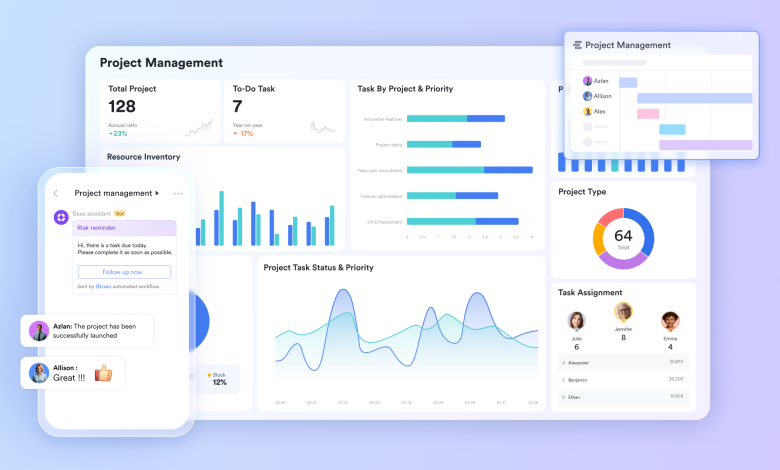
There is a particular kind of exhaustion that remote workers know well. It is not the exhaustion of hard work. It is the exhaustion of constant redirection: the email that needs to become a task, the task that needs to become a meeting, the meeting that needs to become a document, and the document that needs to become a decision. Each of these transitions requires a context switch, and each context switch costs time, attention, and momentum. Teams that have solved this problem share a common trait: they stopped treating their tools as individual apps and started treating them as a connected system. The most effective way to build that system is to start with a unified set of project management tools where decisions, documents, tasks, and conversations all live in one place and flow naturally from one to the next.
Turning conversations into documented decisions with Lark Docs
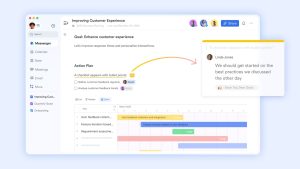
Most decisions made in chat threads disappear. The conversation scrolls away, someone misremembers the conclusion, and a week later the same discussion happens again from scratch. Lark Docs gives teams a place to anchor decisions so that the conclusion of a conversation becomes a permanent, editable, searchable record rather than a message that gets buried in a feed.
When a team reaches a decision in a Messenger thread, any team member can create a linked doc directly from within the chat and capture the outcome while the context is still fresh. The document doesn’t have to be polished — it just has to exist. From that point on, the decision lives in a place where it can be referenced, updated, and shared without anyone having to search through chat history to reconstruct what was agreed.
Lark Docs also supports real-time co-editing by up to 200 simultaneous contributors, which means that when a decision does require broader input, multiple stakeholders can write, comment, and refine the document at the same time rather than passing a file back and forth across email chains. The output is a single living document that reflects the team’s current thinking rather than a pile of version-controlled attachments.
Clearing the approval queue without manual follow-up with Lark Approval
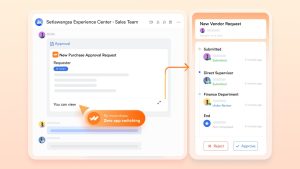
- Parallel approval routing. Unlike serial workflows where each approver must wait for the previous one to sign before they receive the request, Lark Approval allows multiple stakeholders to review and approve simultaneously. A contract that once took three days to clear a chain of four reviewers can be completed in hours when all four receive it at the same time.
- Auto-delegation for absent approvers. Approval workflows can be configured with backup approvers who receive the request automatically if the primary approver does not respond within a defined timeframe. Projects stop stalling because one person is travelling, in back-to-back calls, or in a different time zone.
- “Forward Approvals to Chat.” Once an approval is completed, the outcome and any attached comments can be sent directly into a designated Messenger group so that the relevant team is notified immediately without needing to check the approval system separately.
Keeping the whole team on the right calendar with Lark Calendar
- Centralized calendar visibility across teams. Managing schedules across time zones, departments, and projects can quickly become complex. Lark Calendar provides a shared view of availability and events, helping teams coordinate meetings, prepare in advance, and stay aligned without constant back-and-forth communication.
- Scheduling meetings directly from chat. With the “Schedule in Chat” feature, team leads can compare participants’ availability within the same conversation where the meeting is discussed. This removes the need to switch tools, send scheduling polls, or wait for replies, allowing decisions to be made faster and in context.
- Shared calendar subscriptions for recurring events. For recurring events like town halls, sprint reviews, or product launches, “Calendar Subscription” allows team members to follow a shared calendar. Relevant events automatically appear in their schedules, and new members gain immediate visibility into upcoming milestones without manual coordination.
Structuring team knowledge so it actually gets used with Lark Wiki
- Organized hierarchy that scales. Lark Wiki supports nested page structures that can be organized by department, project, or topic, so information grows in a logical shape rather than becoming a flat archive of unrelated files. A team can have a top-level space for Engineering with sub-spaces for each product line, each containing its own runbooks, architecture notes, and onboarding guides.
- “Migration” from existing tools. Teams moving away from Confluence, Word, Excel, CSV, or XMind files can bring their entire existing knowledge base into Lark Wiki without losing content or manually recreating documents. The transition from a fragmented document system to a structured wiki doesn’t require starting from scratch.
- Sidebar access without leaving the current task. The full Wiki knowledge base is accessible from a sidebar panel that can be opened without leaving any other Lark tool. A team member writing a proposal in Docs can pull up the relevant brand guidelines from Wiki in the same window without opening a new tab or switching applications.
Connecting daily work to company-wide goals with Lark OKR
- Making strategic priorities visible across the organization. Remote teams often lose alignment as individuals focus on their own tasks without a clear connection to company goals. Lark OKR provides a shared view of objectives and key results, helping every team member understand how their work contributes to broader priorities and reducing the risk of misaligned effort.
- Real-time visibility into progress and gaps. With all objectives and key results accessible across teams, progress is continuously visible. When a key result starts to fall behind, team members can identify the gap early and adjust priorities or raise concerns without waiting for formal reviews or meetings.
- Connecting daily work to strategic outcomes. Lark OKR allows teams to link key results to related tasks and projects within the workspace. This ensures that operational progress is reflected in the overall strategic view, reducing delays between execution and reporting and enabling more forward-looking discussions during reviews.
Bringing presentations to life without extra preparation time with Lark Slides
- In-slide comments tied to specific elements. Team members can leave comments on individual slides, text blocks, or data charts rather than writing general feedback in a separate document. The person incorporating the feedback knows exactly which element each comment refers to, reducing the back-and-forth that typically adds a full revision cycle to every presentation.
- Linked live data from Lark Sheets. Charts embedded in Lark Slides can pull data directly from a connected Lark Sheets source, so the figures in a presentation update automatically when the underlying numbers change. A weekly business review deck that used to require a manual data refresh before every meeting stays current on its own.
- Present anywhere via live link. Any Lark Slides presentation can be shared via a live link that opens on any device without requiring the recipient to have the Lark app installed. Remote stakeholders can review a presentation at their own pace without scheduling a dedicated screen-share session.
Bonus: Where the traditional SaaS stack breaks down
When remote teams first set up their tooling, the standard approach is to look at what the most successful companies are using and replicate the stack. That usually means checking Google Workspace pricing for the foundational layer, then adding specialist tools for project management, documentation, goal tracking, and presentation. The logic is sound: each tool is best-in-class for its specific function.
The problem shows up in the gaps. When your goal-tracking tool doesn’t know what your project management tool is doing, someone has to manually update both. When your presentation tool doesn’t read from your spreadsheet, someone has to rebuild the charts. When your wiki doesn’t talk to your chat tool, someone has to copy and paste the relevant section into the conversation. Those manual bridges are not rare exceptions; they are the constant, invisible work that fragments your team’s attention every day. Lark removes the gaps by keeping all of these functions in a single environment where information flows between them without anyone having to push it.
Conclusion
Reclaiming focus at work is not about working fewer hours or checking fewer messages. It is about building an environment where the natural flow of work — from conversation to decision to document to task to outcome — doesn’t require jumping between disconnected tools. When your team operates inside a connected set of productivity tools where each step in the workflow leads naturally to the next, the friction disappears, and the attention that was being spent on managing tools comes back to doing the actual work.


